
Strengthening Business Security with Zero Trust & ZTNA Solutions
Your business can’t afford to run on old ideas about security. Zero Trust isn’t just a trendy term. Here’s why, and how it’s changing how smart businesses in Vancouver protect what’s most important.
If someone is already inside your network, the padlock on the front door doesn’t mean anything. Before remote work, cloud apps, and cybercriminals learned how to walk right through your “trusted” network as they own it, a castle-and-moat was built for a world that no longer exists. That’s why Zero Trust was developed, and businesses that haven’t switched to it yet are taking a gamble.
The Reality in Business Nowadays.
- According to the Verizon DBIR, 81% of data breaches happen when credentials are stolen
- 4.9 million dollars is the average cost of a data breach in Canada (IBM Security 2023)
- After a big cyberattack, 60% of small and medium-sized businesses go out of business within six months.
What Exactly Is Zero Trust? (And Why the Name Is Slightly Misleading)
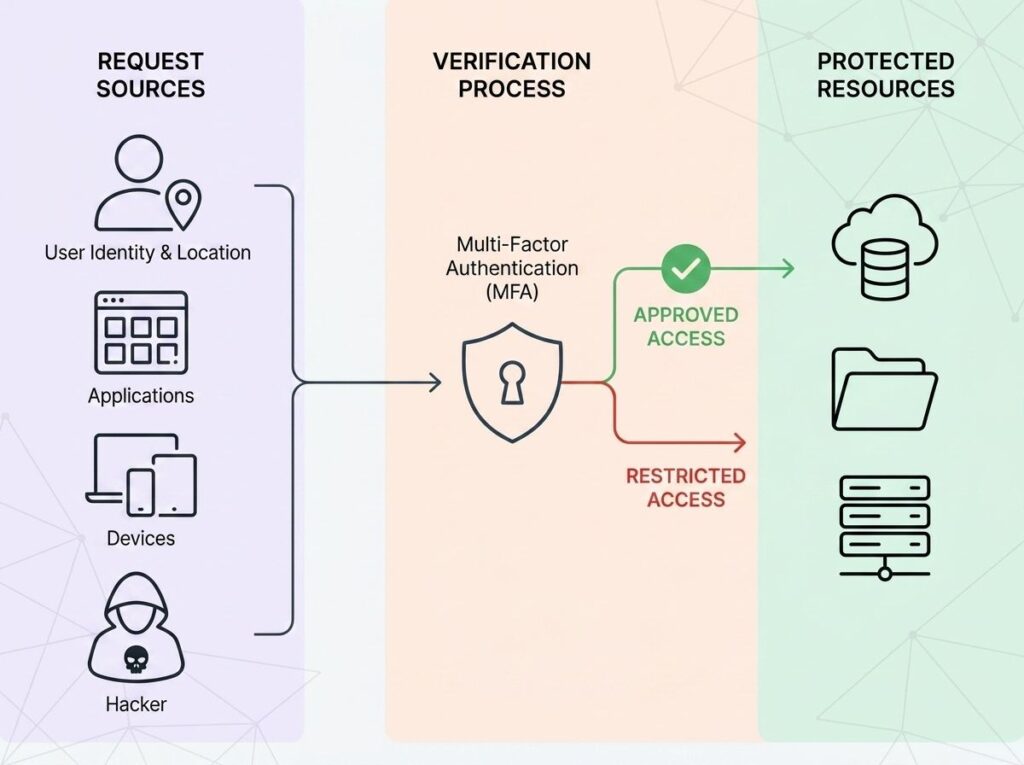
Let’s clear something up right away. Zero Trust does not imply that you do not trust your employees or suspect everyone of being a criminal. The meaning of this is as follows: your network never trusts anybody by default, not even your own people, without first making sure they are proven.
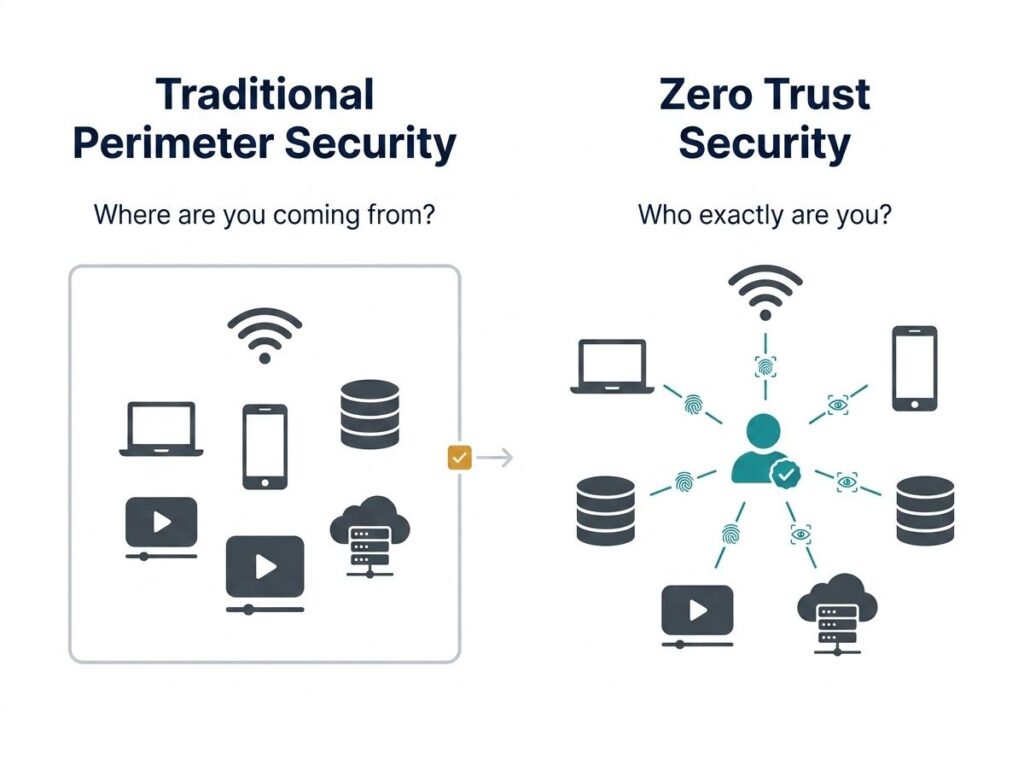
Consider it in this manner. A conventional network can be compared to an office building where all employees can freely access every floor of the building, all of the server rooms, and all of the file cabinets. As soon as you are in the front door, you are believed everywhere. Zero Trust inverts that paradigm. Each individual, each gadget, each application request is verified – every time – no matter the source.
The guiding principle? Always be suspicious, never trust.
The Point: You can’t buy Zero Trust as a product. It is a mental model of a security system that is based on constant verification, least-privilege access, and the idea that any network could be hacked at any time.
Why Your Old Security Model Is a Business Liability in 2026
This is where things get serious. The old perimeter-based security model made sense when most of your team worked in the same office, and all of your apps were on the same server. You put up a digital wall, locked the door, and called it a day.
However, the contemporary business world is totally different. Your staff collaborates at home, coffee shops, and with clients. Your information is stored in Microsoft 365, your CRM, your accounting system, and three cloud services. You have your contractors, whose devices require access to certain sections of your system, and your vendors, who require access to other parts of your system.
The online frontier that your previous firewall had been guarding? It doesn’t exist anymore.
The Three Biggest Gaps in Traditional Security
ZTNA Zero Trust Network Access ZTNA is a practical, technical execution of Zero Trust principles, in this case, to regulate the access of users to applications and data.
Unlike traditional VPNs, where you get access to the entire network after authentication, ZTNA only grants access to specific applications, based on verified identity and device health; nothing more, nothing less. It is the difference between giving a person the master key to your building and a one-time access card to one room.
VPNs vs. ZTNA: VPNs are still commonly used as the main remote access tool by many businesses. Even though VPNs encode your traffic, they nonetheless allow access to the wider network when connected; in other words, a hacked account can still freely roam. ZTNA removes such exposure.
Breaking Down ZTNA: Zero Trust Network Access
ZTNA Zero Trust Network Access ZTNA is a practical, technical execution of Zero Trust principles, in this case, to regulate the access of users to applications and data.
Unlike traditional VPNs, where you simply get access to the entire network after authentication, ZTNA only gives access to particular applications, with verified identity and health of the device; nothing more, nothing less. It is the difference between giving a person the master key to your building and a one-time access card to one room.
VPNs vs. ZTNA: VPNs are still commonly used as the main remote access tool by many businesses. Even though VPNs encode your traffic, they nonetheless allow access to the wider network when connected; in other words, a hacked account can still freely roam. ZTNA removes such exposure.
Traditional VPN vs ZTNA (Zero Trust Network Access)
Feature | Traditional VPN | ZTNA |
Access model | Full network access after login | Per‑application, per‑session access only |
Identity verification | One‑time authentication at login | Continuous, adaptive verification |
Device trust check | Minimal or none | Real‑time device posture assessment |
Lateral movement risk | High — users can move freely inside the network | Eliminated through micro‑segmentation |
Cloud & remote work fit | Poor for distributed teams | Built for hybrid & cloud environments |
Compliance support | Basic logging and controls | Detailed audit trails & policy enforcement |
The Core Pillars of a Zero Trust Framework
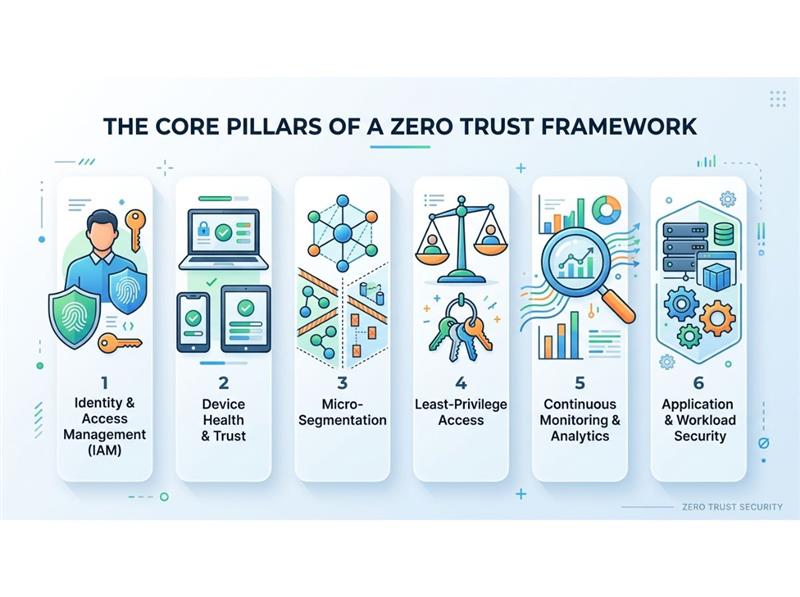
Zero trust is not a one-size-fits-all security product. It is all about creating a multi-layered, intelligence-driven security posture that constantly validates trust amongst users, devices, networks, and applications.
The six pillars that render a Zero Trust strategy effective are listed below.
Identity & Access Management (IAM)
Zero Trust is built on solid IAMs like multi-factor authentication (MFA), single sign-on (SSO), and continuous identity checks. Access decisions are to be made on a session-by-session (and sometimes session-by-session) basis, rather than on a per-login basis.
Purpose/Objective: Make sure that only the correct identities are able to access the correct resources under the correct conditions.
Device Health & Trust
Not every device is so reliable.
Security posture is assessed in real time on every device seeking access, which includes OS version, patch levels, endpoint protection, and configuration compliance. The device is unknown, unhealthy, or unmanaged, which provokes restrictions or denial of access.
Goal: Prevent compromised or non‑compliant devices from becoming attack vectors.
Micro‑Segmentation
Suppose a breach–and contain.
Zero Trust divides the network into small, isolated networks. Attackers cannot migrate to other systems and data even when they have access to one component of the environment.
Purpose: To restrict the blast radius and ensure that attackers do not walk freely within the network.
Least‑Privilege Access
It takes a lifetime to be made a member.
Only the minimum permissions are granted to users, services, and applications to allow them to execute their purpose. Privileges are restricted, time-based, and automatically adjusted with a change of role or risk level.
Aim: Minimize the effects of credential compromise and reduce insider risk.
Continuous Monitoring & Analytics
Trust is not fixed but a dynamic thing.
Zero Trust relies on real-time data on user actions, device usage, and data traffic. More intelligent analytics and automation identify anomalies as they occur, allowing more rapid action to be taken before harm is caused.
Aim: To identify and act on threats promptly when they appear, rather than when they have been successful.
Application & Workload Security
In no environment can one trust.
Regardless of the type of workloads implemented in the cloud, on-premises, or a combination of both, all workloads can be subject to the same Zero Trust controls. Users and services are explicitly authenticated by applications, not based on network location.
Purpose: Achieve contemporary, distributed applications wherever it is at work.
How to Start Your Zero Trust Journey: A Practical Roadmap
And this is the most important point to make: Zero Trust is not a black and white on-off switch that you can just switch on one day. The most successful organizations do not consider it as a single project, but rather an evolutionary process.
The following is an effective, real-life guideline that can help you begin.
1. Map Your Digital Assets and Access Points
You can’t keep something safe if you can’t see it.
Start by checking every device, app, user account, and data flow in your environment, both on-premises and in the cloud. This lack of visibility is the main reason why companies get hacked without warning.
The result is a clear understanding of what is there, who can get to it, and how.
2. Deploy Multi‑Factor Authentication Everywhere
The most inexpensive and safest method of reducing your attack surface is through multi-factor authentication (MFA), which is the quickest.
Turn on MFA in Microsoft 365, VPNs, financial and accounting systems, and any system that touches sensitive data. This is a one-step block to most credential-based attacks in most organizations.
Result: Stolen passwords cannot now be used to compromise your company.
3. Apply Least‑Privilege Access Across Your Team
See who can access what, and delete anything unnecessary.
Users must only have the permissions pertinent to their role and no more. This severely restricts the effect of any compromised account and lessens the insider risk.
Result: Reduced blast radius in case of something wrong.
4. Segment Your Network
Work with your IT partner to introduce network micro‑segmentation, separating critical systems from general business traffic.
Assuming ransomware or malware takes root, it will not be able to propagate laterally throughout your environment with the help of segmentation.
Result: Attacks do not cascade but are contained.
5. Implement Continuous Monitoring and Response
Static controls don’t work with Zero Trust.
Set up 24/7 monitoring to find strange things like:
- Logins at strange times
- Devices that aren’t recognized
- Data transfers that make you suspicious
The speed of detection directly affects how bad the impact is.
Result: quicker response, less damage, and better recovery results.
Zero Trust for Small and Mid‑Sized Businesses: Not Just for Enterprises
The most widespread myth that we hear is that we are too small to be targeted.
Factually, that is the same belief that attackers depend on.
Small and mid-sized businesses are actively targeted by cybercriminals due to their presumed weaker defenses. Although a large proportion of attacks are against SMBs, there is a low percentage of organizations that have mature security controls.
The good news: Zero Trust is scalable. A good Zero Trust posture is not only within reach of a 20-person company but also of a Fortune 500 company with the right tools, processes, and guidance to establish a robust Zero Trust posture.
This is our own experience at ComputerWorks, in the Greater Vancouver and Lower Mainland areas.
The ComputerWorks Advantage
Our group develops, integrates, and oversees customized cybersecurity and compliance programs based on your company. This includes:
- Risk evaluations and plans for security
- Rollouts of MFA and identity protection
- Network segmentation and security at the endpoint
- 24/7 monitoring and incident response
You take care of your business. We work hard to keep it safe.
Zero Trust and Insurance Compliance: A Hidden Business Benefit
Many people who apply for cyber insurance find out too late that security controls now decide who can get insurance.
Insurance companies are quickly making their requirements stricter. A lot of policies now require:
- Enforced MFA
- Segmentation of the network
- Finding and responding to endpoints
- Policies for access and incident response that are written down
Companies that use Zero Trust aren’t just making things safer; they’re also making it easier to get insurance, lowering premiums, and getting better claim results.
Key advantages include:
- Documented access controls that show due diligence
- MFA enforcement is a basic requirement for insurance
- Audit logs that are very detailed for regulators and insurers
- Structured incident response plans help claims get settled faster.
The Bottom Line: Security Is Not a One‑Time Purchase
We interview business owners who believe they were covered every week:
- Antivirus? Check.
- Firewall? Check.
- VPN for remote staff? Check.
And then something happens.
- One account is compromised by a phishing email.
- Ransomware codes important systems.
- An infected machine of a contractor provides access to the data of clients.
The future of cybersecurity in 2026 does not lie in creating a single wall, but the future is a living and dynamic system to verify, monitor, and ensure access control through intelligent means.
That is Zero Trust.
And you need not construct it on your own. ComputerWorks has been assisting organizations throughout Greater Vancouver and the Lower Mainland in developing more robust and intelligent IT bases over the years- and we can facilitate yours.
Checklist:
What Exactly Is Zero Trust? (And Why the Name Is Slightly Misleading)
Why Your Old Security Model Is a Business Liability in 2026
The Three Biggest Gaps in Traditional Security
Breaking Down ZTNA: Zero Trust Network Access
Traditional VPN vs ZTNA (Zero Trust Network Access)
The Core Pillars of a Zero Trust Framework
Identity & Access Management (IAM)
How to Start Your Zero Trust Journey: A Practical Roadmap
Zero Trust for Small and Mid‑Sized Businesses: Not Just for Enterprises
Zero Trust and Insurance Compliance: A Hidden Business Benefit